

Motorhome WiFi: how to get better motorhome internet
Motorhome WiFi: how to get better motorhome internet
There are effective options for getting internet in your motorhome, from WiFi boosters and MiFi devices to antennas. This is your complete guide to getting better internet in your motorhome

Rachel Scholes Content Editor: Motorhomes
Rachel Scholes Content Editor: Motorhomes
Internet in your motorhome
There are various options to get internet in your motorhome, and the one you require will depend on your intended usage....
Motorhome WiFi options
The basic option: campsite WiFi
Many campsites offer WiFi, but there can be issues. Sites in the countryside often suffer from the same poor broadband that blights many people living in rural areas.
This means that, while campsite WiFi was fine 10 years ago for email and basic web, it is unable to keep up with the demands of streaming TV and video calls. Unless you want to wander around the information hub at a campsite, blinking in the rain as you search for the perfect spot to get a basic connection, you're going to need a better option.
Motorhome WiFi boosters
Boosters function exactly as you might expect – they take an existing WiFi network and boost the strength of the signal.
However, on a site where the WiFi is operating at 100% capacity, then the bottleneck is often outside of your control and a WiFi booster doesn’t have the desired effect.
To create a strong connection, you'll need an internet source within your control.
Built-in motorhome WiFi
Increasingly, motorhomes are coming with WiFi built in.
Auto-Sleepers offers a factory-fit 5G roof antenna and router in every vehicle. Auto-Trail now offers it as a factory-fit option. Most dealers also offer an aftermarket mobile broadband option. This comes off the back of many appliances and electronics needing to talk to various apps for remote monitoring and control.
A roof-mounted cellular antenna fits to the roof of the motorhome or campervan and is far more efficient at picking up weak 3G, 4G and latterly 5G signals compared to a phone. This means, even if a smartphone has poor or no service, an antenna could be picking up a usable cellular signal.
There are also more portable versions, whereby you attach the antenna to the side of your motorhome and run the cable through a window. These have the benefits of not needing holes drilled through the vehicles and avoiding the necessary installation costs for the fixed systems.
The antenna is connected to a router inside the motorhome to provide a secure wireless connection for all of your devices. Smartphones, laptops, tablets and smart TVs can connect and share an internet connection just like at home. This can be used stationary or in motion, in the UK or abroad.
If your phone supports it, you could also benefit from ‘WiFi calling’ where your calls are routed via the internet if you have no signal – effectively working as a mobile signal booster. If you don’t have this feature then WhatsApp, Facetime or other messenger audio or video calls could be used instead.
You should be able to put any SIM card from any network into the router, a pay-as-you-go (PAYG) SIM, a contract SIM if you are a heavy data user or a local SIM card purchased abroad.
MiFi or dongle devices
There are two options for standalone devices – the dongle and MiFi devices.
While dongles have to be plugged into a device to work – only providing internet to that one device – MiFi hubs can provide WiFi for multiple devices in your motorhome, whether that’s your phone, TV, tablet or other internet-enabled gadgets.
This frees up your smartphone and allows you to use an alternative SIM or a different network. While this is a good starting point and, for some, entirely suitable, for others in rural areas the speed or quality of the connection might struggle.
Tethering via a mobile device
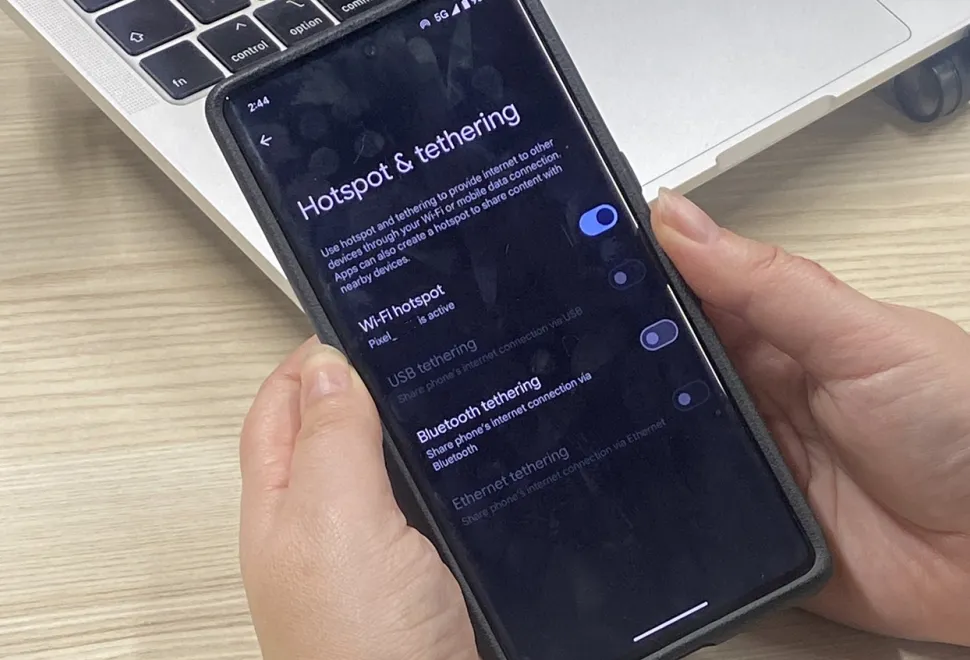
Smartphones offer the chance for a connection via the 3G, 4G and the 5G network where available (it is expected that the majority of the UK will have access to the 5G network by 2027). Most smartphones have the facility to tether, that is to share the connection from a phone via WiFi to other devices.
Getting WiFi in your motorhome
Before you invest in a mobile WiFi device of any type, make sure you're clear on which network you'll connect to.
If you mainly travel in the UK, there are four main networks – Vodafone, EE, O2 and Three. Other providers are available, but they will mainly use the infrastructure from the big four, as they are called. While the best value often comes in the form of a contract, paying a monthly fee may not be desirable.
EE tends to have superior UK coverage. Consequently, the cost per GB is a bit higher than other networks.
Money-saving expert, Look After My Bills, published the findings of a new report that shows the network coverage in the UK. Apparently, Vodafone was second, followed by Three and then O2. The report suggested that the results have improved since last year’s report, so coverage seems to be improving across the board.
For reference, giffgaff, Sky Mobile and Tesco Mobile use the O2 network, BT Mobile, Lyca Mobile and Virgin Mobile use EE; iD Mobile and Smarty uses Three, and Voxi piggybacks on the Vodafone network.
Maxview has some useful advice on this topic, too.
Motorhome WiFi: FAQs
-
What router specification do I need to stream TV?
There are a couple of key numbers you’ll need to check out.
Download speeds need to be at least 10Mbps (megabits per second), although some services do require more. There’s also the band the router works on – 2.4Ghz and 5Ghz. The lower figure has more range but will be slower, while the faster speed band width means the WiFi signal won’t transmit as far.
-
Can I get motorhome internet in Europe?
The legislation that ended European roaming charges is no longer law, although some networks still include it with a specific plan and some don’t.
It’s a total minefield, to be honest, but if you plan to hop over to Europe in your motorhome, check the allowances on your existing mobile phone. If you have no roaming included, you’ll either have to buy top-ups (incurring a daily charge), buy a bundle to cover the time you are away, install a new data-only SIM that includes roaming or switch providers.
It seems to us that a specific data-only SIM might be cheaper than buying regular top-ups with your existing mobile provider.
If you are planning a long tour, check the time limitations as some contracts/SIMS will cover up to 60 days of data; some are less and some are more, so this is an important point to check. To get around this you could have multiple SIMS to cover the whole trip.
Latest motorhome articles

Explore our magazines
Enjoy expert tech help, travel and campsite inspiration, buying advice, reviews, and more with our best-selling magazines and guides.

Buying Your Perfect Motorhome
Buying Your Perfect Motorhome is the ultimate guide to turn your motorhome adventure into reality. From models starting at £20k to luxury options, layouts, finance, insurance, and a dealer directory, it has everything you need to find your dream motorhome.

MMM magazine
MMM is the UK’s best-selling motorhome magazine and your key to unforgettable trips, both in the UK and overseas. Packed with expert reviews, advice and maintenance tips to help you make the best choices and keep your motorhome roadworthy.


